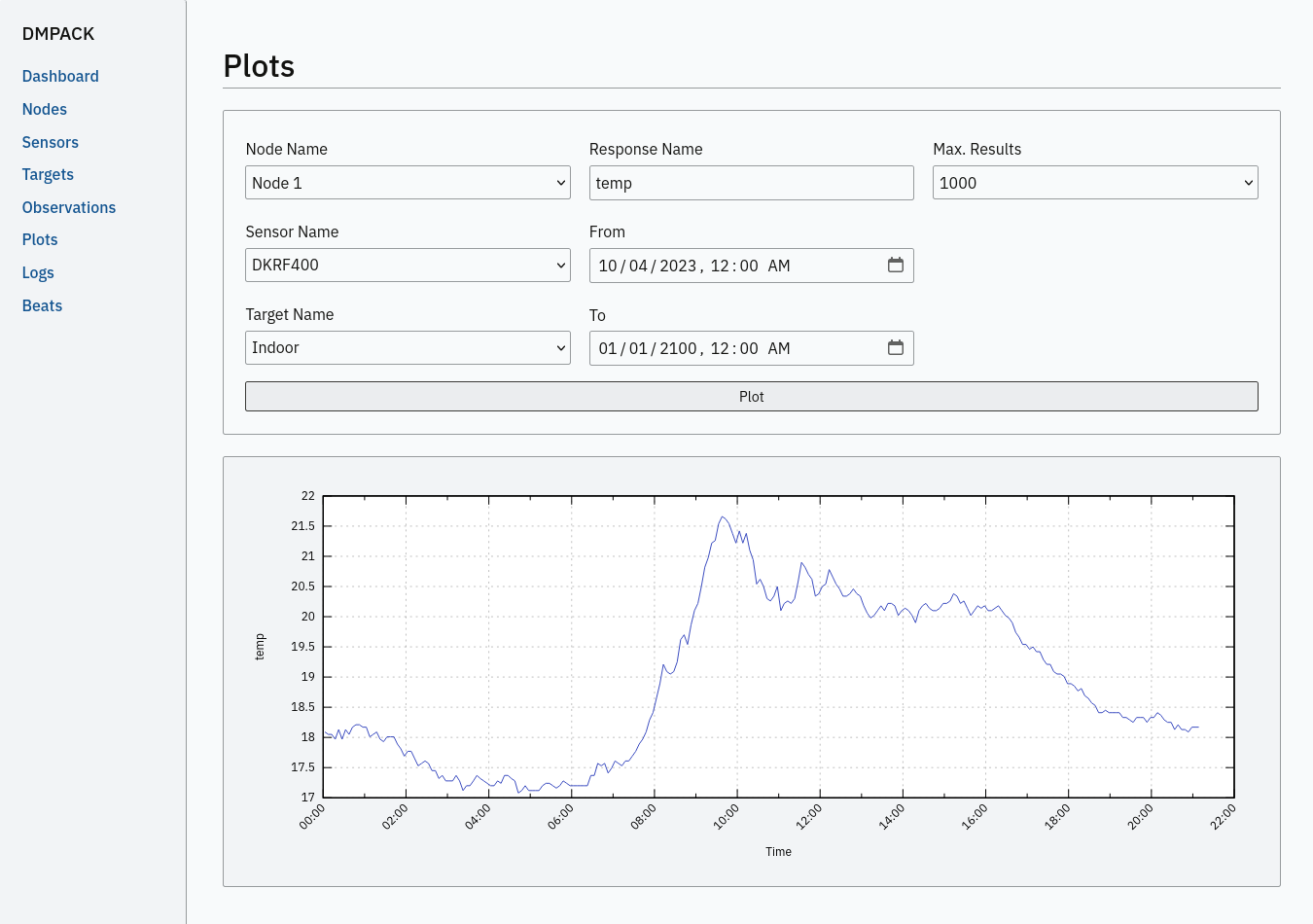
Programs
This section contains descriptions of all DMPACK programs with their respective command-line arguments. Some programs
read settings from an optional or mandatory configuration file. Example configuration files for all programs are
provided in directory /usr/local/etc/dmpack/.
The configuration files are ordinary Lua scripts, i.e., you can add Lua control structures for complex tables or
access the Lua API of DMPACK. In your editor, set the language to Lua to enable
syntax highlighting (for instance, set syntax=lua in Vim), or use file ending .lua instead of
.conf.
The set-up of the web applications is outlined in the next section.
| Environment Variable | Description |
|---|---|
DM_LOGGER |
Name of dmlogger instance to send logs to. |
NO_COLOR |
Disable ANSI colour output if set to 1. |
dmapi
dmapi is an HTTP-RPC API service for remote DMPACK database access. The web application has to be executed through a FastCGI-compatible web server. It is recommended to use lighttpd(1). The service is configured through environment variables. The web server or FastCGI spawner must be able to pass environment variables to dmapi.
The dmapi service offers endpoints for clients to insert beats, logs, and observations into the local SQLite database, and to request data in CSV or JSON format. Only HTTP GET and POST requests are accepted. All POST data has to be serialised in Fortran 95 Namelist format, with optional deflate or zstd compression. Section RPC API gives an overview of the available endpoints.
Authentication and encryption are independent from dmapi and have to be provided by the web server.
If HTTP Basic Auth is enabled, the sensor id of each beat, log, node, sensor, and observation sent to the HTTP-RPC
service must match the name of the authenticated user. For example, to store an observation of a node with the id
node-1, the user name of the client must be node-1 as well. If the observation is sent by any
other user, it will be rejected (HTTP 401).
| Environment Variable | Description |
|---|---|
DM_BEAT_DB |
Path to heartbeat database (required). |
DM_IMAGE_DB |
Path to image database (optional). |
DM_IMAGE_DIR |
Path to image file directory (optional). |
DM_LOG_DB |
Path to log database (required). |
DM_OBSERV_DB |
Path to observation database (required). |
DM_READ_ONLY |
Set to 1 to enable read-only database access. |
The response format depends on the MIME type set in the HTTP Accept header of the request, either:
application/json(JSON)application/jsonl(JSON Lines)application/namelist(Fortran 95 Namelist)text/comma-separated-values(CSV)text/plain(plain text)
By default, responses are in CSV format. The Namelist format is available only for single records. Status messages
are returned as key–value pairs, indicated by content type text/plain.
See section RPC Server for a basic lighttpd(1) configuration.
dmbackup
The dmbackup utility creates an online backup of a running SQLite database. By default, the SQLite backup API is used. Existing backup databases are not replaced.
The program is functional equivalent to running the sqlite3(1) command-line interface:
$ sqlite3 <database> ".backup '<backup>'"To synchronise a database with a different host through SSH, run the database remote-copy tool sqlite3_rsync(1) instead, for example:
$ sqlite3_rsync -v /var/dmpack/observ.db user@host:/var/backup/observ.db
sent 411,141,667 bytes, received 22 bytes, 45,911,969.74 bytes/sec
total size 410,640,384
The tool must be installed on both systems.
Command-Line Options
| Option | Short | Default | Description |
|---|---|---|---|
--backup file |
-b |
– | Path of the backup database. |
--database file |
-d |
– | Path of the SQLite database to backup. |
--help |
-h |
– | Print available command-line arguments and quit. |
--vacuum |
-U |
off | Use VACUUM INTO instead of the SQLite backup API. |
--verbose |
-V |
off | Print backup progess to stdout (not in vacuum mode). |
--version |
-v |
– | Print version information and quit. |
--wal |
-W |
off | Enable WAL journal for backup database. |
Examples
Create an online backup of an observation database:
$ dmbackup --database /var/dmpack/observ.db --backup /tmp/observ.dbdmbeat
The dmbeat program is a heartbeat emitter that sends handshake messages via HTTP POST to a remote dmapi service. Heartbeats include the following attributes:
| Attribute | Description |
|---|---|
node_id |
Node id. |
address |
IPv4/IPv6 address of client. |
client |
Client software name and version. |
time_sent |
Date and time heartbeat was sent (ISO 8601). |
time_recv |
Date and time heartbeat was received (ISO 8601). |
error |
Last client connection error. |
interval |
Emit interval in seconds. |
uptime |
Client uptime in seconds. |
The server may inspect the data to check if a client is still running and has network access. The RPC endpoint on the
server is expected at URL [http|https]://<host>:<port>/api/v2/beat.
Command-Line Options
| Option | Short | Default | Description |
|---|---|---|---|
--compression name |
-x |
zstd |
Compression library to use (none, zlib, zstd). |
--config file |
-c |
– | Path to configuration file. |
--count n |
-C |
0 | Number of heartbeats to send (unlimited if 0). |
--debug |
-D |
off | Forward log messages of level debug (if logger is set). |
--help |
-h |
– | Print available command-line arguments and quit. |
--host host |
-H |
– | IP or FQDN of HTTP-RPC API host (for instance, 127.0.0.1 or iot.example.com). |
--interval sec |
-I |
0 | Emit interval in seconds. |
--logger name |
-l |
– | Optional name of logger. If set, sends logs to dmlogger process of given name. |
--name name |
-n |
dmbeat |
Optional name of instance and table in configuration. |
--node id |
-N |
– | Node id. |
--password string |
-P |
– | API password. |
--port port |
-q |
0 | Port of HTTP-RPC API server (0 for automatic). |
--tls |
-E |
off | Use TLS encryption. |
--username string |
-U |
– | API user name. If set, implies HTTP Basic Auth. |
--verbose |
-V |
off | Print log messages to stderr. |
--version |
-v |
– | Print version information and quit. |
Examples
Send a single heartbeat to a dmapi service on localhost:
$ dmbeat --node dummy-node --host 127.0.0.1 --count 1 --verboseA sensor node with id dummy-node must exist in the server database. The web application dmweb lists the beats received by the server.
dmbot
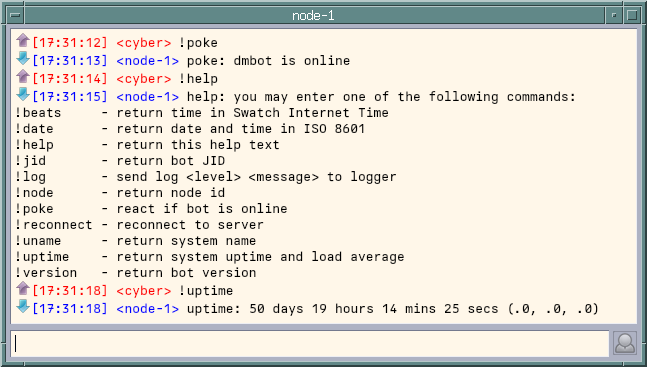
The dmbot program is an XMPP bot that accepts commands via chat. Access to the bot is limited to the
JIDs added to table group in the configuration file. Requests from clients whose JID is not in the table
will be rejected. If table group is empty, all clients are allowed to send commands to the bot.
The XMPP resource is automatically set to the name of the bot instance. If the JID of the bot account is
bot@example.com and the bot name is dmbot, the full JID will be set to
bot@example.com/dmbot.
All commands start with prefix !. For an overview, send chat command !help to the bot. The
bot understands the following commands:
- !beats
-
Return current time of the sensor node in Swatch Internet Time (.beats).
- !date
-
Return date and time of the sensor node in ISO 8601.
- !help
-
Return help text.
- !jid
-
Return full JID of bot.
- !log <level> "<message>"
-
Send log message of given level to logger. The argument
levelmust be a valid log level name or numeric log level. The argumentmessagemust be in quotes if it contains spaces. - !node
-
Return node id of bot.
- !poke
-
Return a message if the bot is online.
- !reconnect
-
Reconnect bot to server.
- !uname
-
Return name and version of the operating system.
- !uptime
-
Return system uptime and load.
- !version
-
Return bot version.
Passing the XMPP credentials via the command-line arguments --jid and --password is
insecure on multi-user operating systems and only recommended for testing.
Command-Line Options
| Option | Short | Default | Description |
|---|---|---|---|
--config file |
-c |
– | Path to configuration file. |
--debug |
-D |
off | Forward log messages of level debug (if logger is set). |
--help |
-h |
– | Print available command-line arguments and quit. |
--host host |
-H |
– | FQDN of XMPP server (for instance, example.com). |
--jid string |
-J |
– | Bot Jabber id (for example, bot@example.com). |
--logger name |
-l |
– | Optional name of logger. If set, sends logs to dmlogger process of given name. |
--name name |
-n |
dmbot |
Optional name of instance, XMPP resource, and table in configuration. |
--node id |
-N |
– | Node id. |
--password string |
-P |
– | Bot password. |
--port port |
-q |
5222 | Port of XMPP server. |
--reconnect |
-R |
off | Reconnect on error. |
--tls |
-E |
off | Force TLS encryption. |
--verbose |
-V |
off | Print log messages to stderr. |
--version |
-v |
– | Print version information and quit. |
Examples
Connect with JID bot@example.com to an XMPP server on port 5223 and wait for commands:
$ dmbot --node dummy-node --jid bot@example.com --password secret \
  --host example.com --port 5223 --tls --verbose
If no configuration file is used, any client may send commands to the bot without authorisation. Start a chat with
the bot JID and send a command. For instance, on command !uptime the bot sends a reply like the
following:
uptime: 0 days 23 hours 57 mins 32 secs (.0, .0, .0)dmcamera
The dmcamera program captures images of an attached USB webcam (V4L2) or remote IP camera (RTSP).
The images are written to file in JPEG or PNG format. If an image database is specified, the image meta data is added to
the database. The database can be created with dminit. The program depends on FFmpeg
and GraphicsMagick. The executables ffmpeg(1) and gm(1) are required. In order to capture USB camera
images on Linux, additionally install package v4l-utils.
A text overlay may be added to the image, containg the date and time it was captured in ISO 8601. The overlay font must be known to GraphicsMagick. For a list of all fonts supported by GraphicsMagick, run:
$ gm convert -list font
Path: /usr/local/lib/GraphicsMagick/config/type-windows.mgk

Name                             Family                  Style   Stretch  Weight
--------------------------------------------------------------------------------
Arial                            Arial                   normal  normal    400
Arial-Black                      Arial                   normal  normal    900
Arial-Bold                       Arial                   normal  normal    700
Arial-Bold-Italic                Arial                   italic  normal    700
Arial-Italic                     Arial                   italic  normal    400
...
Depending on the operating system, you may have to manually modify the GraphicsMagick configuration file
type.mgk according to the fonts installed on the system. Or, use the Perl script
imagick_type_gen.pl to generate a type file type-custom.mgk, for example:
$ find /usr/local/share/fonts/ -type f -name "*.*" | perl ./imagick_type_gen.pl -f - > \
  /usr/local/lib/GraphicsMagick/config/type-custom.mgk
Set the include file in type.mgk to type-custom.mgk or replace type.mgk with
type-custom.mgk altogether.
Command-Line Options
| Option | Short | Default | Description |
|---|---|---|---|
--config file |
-c |
– | Path to configuration file. |
--database file |
-d |
– | Path to SQLite image database. |
--debug |
-D |
off | Forward log messages of level debug (if logger is set). |
--device name |
-C |
– | Camera device type (rtsp or v4l2). |
--directory path |
-p |
– | Directory to store the image files in. |
--font name |
-F |
DejaVuSansMono |
Name of font to use for overlay text. |
--fontsize n |
-Z |
12 | Font size of overlay text. |
--height n |
-H |
0 (auto) | Desired image height. May be ignored if unsupported by camera. |
--help |
-h |
– | Print available command-line arguments and quit. |
--input path |
-i |
– | URL of RTSP stream or path of V4L2 device (for example, rtsp://localhost/ or
/dev/video0). |
--interval n |
-I |
0 (off) | Capture interval in seconds. If 0, only a single image is captured. |
--ipc |
-Q |
off | Uses a POSIX semaphore for process synchronisation. The name of the semaphore matches the instance name (with
leading /). The semaphore is set to 1 whenever an image has been captured. Only a single process may wait
for this semaphore, otherwise, reading occurs in round-robin fashion. |
--logger name |
-l |
– | Optional name of logger. If set, sends logs to dmlogger process of given name. |
--mime name |
-M |
image/jpeg |
MIME type of image format to use (image/jpeg or image/png). |
--name name |
-n |
dmcamera |
Optional name of program instance, configuration, POSIX message queue, and POSIX semaphore. |
--node id |
-N |
– | Node id. |
--overlay |
-O |
off | Add date and time in ISO 8601 as overlay text to image. |
--sensor id |
-S |
– | Sensor id of camera. |
--target id |
-T |
– | Target id of camera view. |
--verbose |
-V |
off | Print log messages to stderr. |
--version |
-v |
– | Print version information and quit. |
--width n |
-W |
0 (auto) | Desired image width. May be ignored if unsupported by camera. |
Examples
Capture an image from an attached USB webcam (V4L2), write image to directory /tmp, and add a text
overlay with date and time in ISO 8601:
$ dmcamera --node dummy-node --sensor dummy-sensor --target dummy-target \
  --directory /tmp --device v4l2 --input /dev/video0 --overlay --verbose
dmdb
The dmdb program collects observations from a POSIX message queue and stores them in an SQLite
database. The name of the message queue equals the given dmdb name and leading /. The IPC
option enables process synchronisation via POSIX semaphores. The value of the semaphore is changed from 0 to 1 if a new
observation has been received. Only a single process shall wait for the semaphore.
Only observation types in binary format are accepted. Log messages are stored to database by the distinct dmlogger program.
Command-Line Options
| Option | Short | Default | Description |
|---|---|---|---|
--config file |
-c |
– | Path to configuration file. |
--database file |
-d |
– | Path to SQLite observation database. |
--debug |
-D |
off | Forward log messages of level debug (if logger is set). |
--help |
-h |
– | Print available command-line arguments and quit. |
--ipc |
-Q |
off | Uses a POSIX semaphore for process synchronisation. The name of the semaphore matches the instance name (with
leading /). The semaphore is set to 1 whenever a new observation was received. Only a single process may
wait for this semaphore, otherwise, reading occurs in round-robin fashion. |
--logger name |
-l |
– | Optional name of logger. If set, sends logs to dmlogger process of given name. |
--name name |
-n |
dmdb |
Optional name of program instance, configuration, POSIX message queue, and POSIX semaphore. |
--node id |
-N |
– | Node id. |
--verbose |
-V |
off | Print log messages to stderr. |
--version |
-v |
– | Print version information and quit. |
Examples
Create a message queue /dmdb, wait for incoming observations, and store them in the given database:
$ dmdb --name dmdb --node dummy-node --database /var/dmpack/observ.db --verboseLog messages and observation ids are printed to stderr if argument --verbose is set.
dmdbctl
The dmdbctl utility program performs create, read, update, or delete operations (CRUD) on the observation database.
- Create
-
Add nodes, sensors, and targets to the database.
- Read
-
Read nodes, sensors, and targets from database. Print the records to standard output.
- Update
-
Update nodes, sensors, and targets in the database.
- Delete
-
Delete nodes, sensors, and targets from the database.
Only nodes, sensors, and targets are supported. All data attributes are passed through command-line arguments.
Command-Line Options
| Option | Short | Default | Description |
|---|---|---|---|
--create type |
-C |
– | Create record of given type (node, sensor, or target). |
--database file |
-d |
– | Path to SQLite observation database (required). |
--delete type |
-D |
– | Delete record of given type (node, sensor, or target). |
--elevation elev |
-E |
– | Node, sensor, or target elevation (optional). |
--help |
-h |
– | Print available command-line arguments and quit. |
--id id |
-I |
– | Node, sensor, or target id (required). |
--latitude lat |
-L |
– | Node, sensor, or target latitude (optional). |
--longitude lon |
-G |
– | Node, sensor, or target longitude (optional). |
--meta meta |
-M |
– | Node, sensor, or target meta description (optional). |
--name name |
-n |
– | Node, sensor, or target name. |
--node id |
-N |
– | Id of node the sensor is associated with. |
--read type |
-R |
– | Read record of given type (node, sensor, or target). |
--sn sn |
-Q |
– | Serial number of sensor (optional). |
--state n |
-S |
– | Target state (optional). |
--type name |
-t |
none |
Sensor type (none, rts,
gnss, …). |
--update type |
-U |
– | Updates record of given type (node, sensor, or target). |
--verbose |
-V |
off | Print log messages to stderr. |
--version |
-v |
– | Print version information and quit. |
--x x |
-X |
– | Local node, sensor, or target x (optional). |
--y y |
-Y |
– | Local node, sensor, or target y (optional). |
--z z |
-Z |
– | Local node, sensor, or target z (optional). |
Examples
Add node, sensor, and target to observation database:
$ dmdbctl -d observ.db -C node -I node-1 -n "Node 1"
$ dmdbctl -d observ.db -C sensor -I sensor-1 -n "Sensor 1" -N node-1
$ dmdbctl -d observ.db -C target -I target-1 -n "Target 1"
Delete a target from the database:
$ dmdbctl -d observ.db -D target -I target-1Read attributes of sensor sensor-1:
$ dmdbctl -d observ.db -R sensor -I sensor-1
sensor.id: sensor-1
sensor.node_id: node-1
sensor.name: Sensor 1
sensor.sn: 12345
sensor.meta: dummy sensor
sensor.type: virtual
sensor.x: 0.000000000000
sensor.y: 0.000000000000
sensor.z: 0.000000000000
sensor.longitude: 0.000000000000
sensor.latitude: 0.000000000000
sensor.elevation: 0.000000000000
dmdwd
The dmdwd program fetches weather reports from the open data API of Deutscher Wetterdienst (DWD) and forwards them to a receiver via POSIX message queue. Node id, sensor id, target id, and station id are mandatory. See the MOSMIX station catalog or the Stationslexikon for a list of all stations.
Observations may contain the following response values, if measured by the weather station:
- cloud_cover
-
Cloud cover total [%].
- temperature_mean_prev_day
-
Daily mean of temperature previous day [°C].
- depth_new_snow
-
Depth of new snow [cm].
- dew_point_temperature_2m
-
Dew point temperature at 2 meters above ground [°C].
- diffuse_radiation_last_hour
-
Diffuse solar radiation last hour [W/m²].
- direct_radiation_last_24h
-
Direct solar radiation last 24 hours [W/m²].
- direct_radiation_last_hour
-
Direct solar radiation last hour [W/m²].
- dry_bulb_temperature_2m
-
Dry bulb temperature at 2 meters above ground [°C].
- evaporation_last_24h
-
Evaporation/evapotranspiration last 24 hours [mm].
- global_radiation_last_hour
-
Global radiation last hour [W/m²].
- global_radiation_last_24h
-
Global radiation last 24 hours [W/m²].
- lowest_cloud_above_station
-
Height of base of lowest cloud above station [m].
- horizontal_visibility
-
Horizontal visibility [km].
- max_wind_speed_mean_prev_day
-
Maximum of 10 minutes mean of wind speed for previous day [km/h].
- max_temperature_prev_day
-
Maximum of temperature for previous day [°C].
- max_temperature_last_12h_2m
-
Maximum temperature last 12 hours 2 meters above ground [°C].
- max_wind_speed_mean_last_hour
-
Maximum wind speed as 10 minutes mean during last hour [km/h].
- max_wind_speed_last_6h
-
Maximum wind speed during last 6 hours [km/h].
- max_wind_speed_prev_day
-
Maximum wind speed for previous day [km/h].
- max_wind_speed_last_hour
-
Maximum wind speed last hour [km/h].
- wind_dir_mean_last_10min_10m
-
Mean wind direction during last 10 min at 10 meters above ground [°].
- wind_speed_mean_last_10min_10m
-
Mean wind speed during last 10 min at 10 meters above ground [km/h].
- min_temperature_prev_day_5cm
-
Minimum of temperature at 5 cm above ground for previous day [°C].
- min_temperature_prev_day
-
Minimum of temperature for previous day [°C].
- min_temperature_last_12h_2m
-
Minimum temperature last 12 hours 2 meters above ground [°C].
- min_temperature_last_12h_5cm
-
Minimum temperature last 12 hours 5 cm above ground [°C].
- last_weather1
-
Past weather 1 [code].
- last_weather2
-
Past weather 2 [code].
- precipitation_last_24h
-
Precipitation amount last 24 hours [mm].
- precipitation_last_3h
-
Precipitation amount last 3 hours [mm].
- precipitation_last_6h
-
Precipitation amount last 6 hours [mm].
- precipitation_last_hour
-
Precipitation amount last hour [mm].
- precipitation_last_12h
-
Precipitation last 12 hours [mm].
- present_weather
-
Present weather [code].
- pressure_mean_sea_level
-
Pressure reduced to mean sea level [hPa].
- relative_humidity
-
Relative humidity [%].
- water_temperature
-
Sea/water temperature [°C].
- temperature_5cm
-
Temperature at 5 cm above ground [°C].
- total_snow_depth
-
Total snow depth [cm].
- total_time_sunshine_last_hour
-
Total time of sunshine during last hour [min].
- total_time_sunshine_last_day
-
Total time of sunshine last day [h].
DWD provides an assignment
table for the weather codes in responses last_weather1, last_weather2, and
present_weather. The MOSMIX station catalog is optional and only used to verify the station id. A valid
station id does not ensure that Deutscher Wetterdienst offers weather reports for this station, as the catalog contains
stations that are out of service.
If the interval is set to 0 (default), the program will exit after the first report has been fetched and forwarded. The program supports the following read modes:
- all
-
Reads all records found in the weather reports file.
- last
-
Reads only the last record in the weather reports file.
- next
-
Waits until the weather report file is updated the next time and then reads the newest record.
By default, read mode last is selected.
Command-Line Options
| Option | Short | Default | Description |
|---|---|---|---|
--catalog file |
-C |
– | Path to MOSMIX station catalog file (optional). |
--config file |
-c |
– | Path to configuration file. |
--debug |
-D |
off | Forward log messages of level debug (if logger is set). |
--help |
-h |
– | Print available command-line arguments and quit. |
--interval sec |
-I |
0 | Interval in seconds in which weather reports are fetched. |
--logger name |
-l |
– | Optional name of logger. If set, sends logs to dmlogger process of given name. |
--name name |
-n |
dmdwd |
Optional name of instance and table in configuration. |
--node id |
-N |
– | Node id. |
--read name |
-R |
last |
Weather report read mode (last, next, or all). |
--receiver name |
-r |
– | Name of observation receiver/message queue. |
--sensor id |
-S |
– | Sensor id. |
--station id |
-m |
– | MOSMIX station id. |
--target id |
-T |
– | Target id. |
--verbose |
-V |
off | Print log messages to stderr. |
--version |
-v |
– | Print version information and quit. |
Examples
Fetch the last weather report of station 10385 (Airport Berlin-Brandenburg) and send the observation to
dmrecv:
$ dmdwd --node dummy-node --sensor dummy-sensor --target dummy-target \
  --station 10385 --read last --receiver dmrecv --verbose
Print the received observation in JSON Lines format to standard output:
$ dmrecv --name dmrecv --type observ --format jsonl --output "-" --verboseAlternatively, the options may be passed through a configuration file to dmdwd, for example:
-- dmdwd.conf
dmdwd = {
  logger = "",
  node = "dummy-node",
  sensor = "dummy-sensor",
  target = "dummy-target",
  catalog = "/usr/local/share/dmdwd/catalog.cfg",
  station = "10385",
  receiver = "",
  read = "last",
  interval = 60 * 10,
  debug = false,
  verbose = false
}
The DWD API is accessed every 10 minutes. The last weather report is read and forwarded to dmdb as an
observation. Node dummy-node, sensor dummy-sensor, and target dummy-target must
exist in the observation database. Start the system monitoring:
$ dmdwd --name dmdwd --config /usr/local/etc/dmpack/dmdwd.conf --verbosedmexport
The dmexport program writes beats, logs, nodes, sensors, targets, observations, and data points from database to file, in ASCII block, CSV, JSON, JSON Lines, Fortran 95 Namelist, or TSV format. The ASCII block format is only available for X/Y data points. The types data point, log, and observation require a sensor id, a target id, and a time range in ISO 8601 format.
If no output file is given, the data is printed to standard output. The output file will be overwritten if it already exists. If no records are found, an empty file will be created.
| Type | Block | CSV | JSON | JSONL | NML | TSV |
|---|---|---|---|---|---|---|
beat |
✓ | ✓ | ✓ | ✓ | ✓ | |
dp |
✓ | ✓ | ✓ | ✓ | ✓ | ✓ |
log |
✓ | ✓ | ✓ | ✓ | ✓ | |
node |
✓ | ✓ | ✓ | ✓ | ✓ | |
observ |
✓ | ✓ | ✓ | ✓ | ✓ | |
sensor |
✓ | ✓ | ✓ | ✓ | ✓ | |
target |
✓ | ✓ | ✓ | ✓ | ✓ |
Command-Line Options
| Option | Short | Default | Description |
|---|---|---|---|
--database file |
-d |
– | Path to SQLite database (required). |
--format format |
-f |
– | Output file format (block, csv,
json, jsonl, nml, tsv). |
--from timestamp |
-B |
– | Start of time range in ISO 8601 (required for types dp, log, and
observ). |
--header |
-H |
off | Add CSV header. |
--help |
-h |
– | Print available command-line arguments and quit. |
--node id |
-N |
– | Node id (required). |
--output file |
-o |
– | Path of output file. |
--response name |
-R |
– | Response name for type dp. |
--sensor id |
-S |
– | Sensor id (requied for types dp and observ). |
--separator char |
-s |
, |
CSV field separator. |
--target id |
-T |
– | Target id (required for types dp and observ). |
--to timestamp |
-E |
– | End of time range in ISO 8601 (required for types dp, log, observ). |
--type type |
-t |
– | Type of record to export: beat, dp, log, node,
observ, sensor, target (required). |
--version |
-v |
– | Print version information and quit. |
Examples
Export log messages from database to JSON file:
$ dmexport --database log.db --type log --format json --node dummy-node \
  --from 2020-01-01 --to 2023-01-01 --output /tmp/log.json
Export observations from database to CSV file:
$ dmexport --database observ.db --type observ --format csv --node dummy-node \
  --sensor dummy-sensor --target dummy-target --from 2020-01-01 --to 2025-01-01 \
  --output /tmp/observ.csv
dmfeed
The dmfeed program creates a web feed from log messages in Atom Syndication Format. The log messages are read from database and written as XML to standard output or file.
The feed id has to be a 36 characters long UUID with hyphens. News aggregators will use the id to identify the feed. Therefore, the id should not be reused among different feeds. Run dmuuid to generate a valid UUIDv4.
The time stamp of the feed in element updated is set to the date and time of the last log message. If no
logs have been added to the database since the last file modification of the feed, the output file is not updated,
unless argument --force is passed. The file modification time of the output file is set to the time stamp
of the last log message. To update the feed periodically, add dmfeed to crontab.
If an XSLT style sheet is given, web browsers may be able to display the Atom feed in HTML format. Set the option to
the (relative) path of the public XSL on the web server. An example style sheet feed.xsl is located in
/usr/local/share/dmpack/.
Command-Line Options
| Option | Short | Default | Description |
|---|---|---|---|
--author name |
-A |
– | Name of feed author or organisation. |
--config file |
-c |
– | Path to configuration file. |
--database file |
-d |
– | Path to SQLite log database. |
--email address |
-M |
– | E-mail address of feed author (optional). |
--entries count |
-E |
50 | Maximum number of entries in feed (max. 500). |
--force |
-F |
– | Force file output even if no new log records are available. |
--help |
-h |
– | Print available command-line arguments and quit. |
--id uuid |
-I |
– | UUID of the feed, 36 characters long with hyphens. |
--maxlevel level |
-K |
critical |
Select log messages of the given maximum log level (from
debug or 1 to user or 6). Must be greater or equal the minimum level. |
--minlevel level |
-L |
debug |
Select log messages of the given minimum log level (from
debug or 1 to user or 6). |
--name name |
-n |
dmfeed |
Name of instance and table in configuration. |
--node id |
-N |
– | Select log messages of the given node id. |
--output file |
-o |
stdout | Path of the output file. If empty or -, the Atom feed will be printed to standard output. |
--subtitle string |
-G |
– | Sub-title of feed. |
--title string |
-C |
– | Title of feed. |
--url url |
-U |
– | Public URL of the feed. |
--version |
-v |
– | Print version information and quit. |
--xsl |
-x |
– | Path or URL to XSLT style sheet. |
Examples
First, generate a unique feed id:
$ dmuuid --hyphens
19c12109-3e1c-422c-ae36-3ba19281f2e
Then, write the last 50 log messages in Atom format to file feed.xml, and include a link to the XSLT
style sheet feed.xsl:
$ dmfeed --database /var/dmpack/log.db --output /var/www/feed.xml \
  --id 19c12109-3e1c-422c-ae36-3ba19281f2e --xsl feed.xsl
Copy the XSLT style sheet to the directory of the Atom feed:
$ cp /usr/local/share/dmpack/feed.xsl /var/www/If /var/www/ is served by a web server, feed readers can subscribe to the feed. Additionally, we may
translate feed and style sheet into a single HTML document feed.html, using an arbitrary XSLT processor,
for instance:
$ xsltproc --output feed.html /var/www/feed.xsl /var/www/feed.xmldmfs
The dmfs program reads observations from file system, virtual file, or named pipe. The program can be used to read sensor data from the 1-Wire File System (OWFS).
If any receivers are specified, observations are forwarded to the next receiver via POSIX message queue.
dmfs can act as a sole data logger if output and format are set. If the output path is set to
-, observations are written to stdout instead of file.
The requests of each observation have to contain the path of the (virtual) file in attribute request.
Response values are extracted by named group from the raw response using the given regular expression pattern.
Afterwards, the observation is forwarded to the next receiver via POSIX message queue.
A configuration file is mandatory to describe the jobs to perform. Each observation must have a valid target id. Node, sensor, and target have to be present in the database.
Command-Line Options
| Option | Short | Default | Description |
|---|---|---|---|
--config file |
-c |
– | Path to configuration file (required). |
--debug |
-D |
off | Forward log messages of level debug (if logger is set). |
--format format |
-f |
– | Output format, either csv or jsonl. |
--help |
-h |
– | Print available command-line arguments and quit. |
--logger name |
-l |
– | Optional name of logger. If set, sends logs to dmlogger process of given name. |
--name name |
-n |
dmfs |
Name of instance and table in configuration. |
--node id |
-N |
– | Node id. |
--output file |
-o |
– | Output file to append observations to (- for stdout). |
--sensor id |
-S |
– | Sensor id. |
--verbose |
-V |
off | Print log messages to stderr. |
--version |
-v |
– | Print version information and quit. |
Examples
Start dmfs to execute the jobs in the configuration file:
$ dmfs --name dmfs --config /usr/local/etc/dmpack/dmfs.conf --verbosedmgrc
The dmgrc program creates log messages from Leica GeoCOM return codes. Observations received by
POSIX message queue are searched for a GeoCOM return code (GRC) response. If the code does not equal
GRC_OK, a log message is sent to the configured logger instance.
By default, observation responses of name grc are verified. For each GeoCOM error code, a custom log
level may be specified in the configuration file. Otherwise, the default log level is used instead.
Command-Line Options
| Option | Short | Default | Description |
|---|---|---|---|
--config file |
-c |
– | Path to configuration file (required). |
--debug |
-D |
off | Forward log messages of level debug (if logger is set). |
--help |
-h |
– | Print available command-line arguments and quit. |
--level level |
-L |
warning |
Default log level (from debug or 1 to user
or 6). |
--logger name |
-l |
– | Name of dmlogger process to send logs to. |
--name name |
-n |
dmgrc |
Name of instance and table in configuration. |
--node id |
-N |
– | Node id. |
--response name |
-R |
grc |
Response name of the GeoCOM return code. |
--verbose |
-V |
off | Print log messages to stderr. |
--version |
-v |
– | Print version information and quit. |
Examples
A configuration file is not required, but allows to specifiy the log level of certain GeoCOM return codes. In the
following example configuration, the default log level for all return codes other than GRC_OK is set to
LL_WARNING. The level is further refined for specific GeoCOM codes:
-- dmgrc.conf
dmgrc = {
  logger = "dmlogger",
  node = "dummy-node",
  response = "grc",
  level = LL_WARNING,
  codes = {
    debug = { GRC_ABORT, GRC_SHUT_DOWN, GRC_NO_EVENT },
    info = { GRC_SLEEP_NODE, GRC_NA, GRC_STOPPED },
    warning = { GRC_TMC_ACCURACY_GUARANTEE, GRC_AUT_NO_TARGET },
    error = { GRC_FATAL },
    critical = {},
    user = {}
  },
  debug = false,
  verbose = false
}
See section GeoCOM API for a table of all supported return codes. Pass the path of the configuration file through the command-line argument:
$ dmgrc --name dmgrc --config /usr/local/etc/dmpack/dmgrc.conf --verboseThe name argument must match the name of the configuration table. A logger process of name dmlogger must
be running to process the generated log messages.
dmimport
The dmimport program reads logs, nodes, sensors, targets, and observations in CSV format from file and imports them into the database. The database inserts are transaction-based. If an error occurs, the transaction is rolled back, and no records are written to the database at all.
The database has to be a valid DMPACK database and must contain the tables required for the input records. The nodes, sensors, and targets referenced by input observations must exist in the database. The nodes referenced by input sensors must exist as well.
Command-Line Options
| Option | Short | Default | Description |
|---|---|---|---|
--database file |
-d |
– | Path to SQLite database (required, unless in dry mode). |
--dry |
-D |
off | Dry mode. Reads and validates records from file but skips database import. |
--help |
-h |
– | Print available command-line arguments and quit. |
--input file |
-i |
– | Path to input file in CSV format (required). |
--quote char |
-q |
– | CSV quote character. |
--separator char |
-s |
, |
CSV field separator. |
--type type |
-t |
– | Type of record to import, either log, node, observ, sensor,
target (required). |
--verbose |
-V |
off | Print progress to stdout. |
--version |
-v |
– | Print version information and quit. |
Examples
Import observations from CSV file observ.csv into database observ.db:
$ dmimport --type observ --input observ.csv --database observ.db --verbosedminfo
The dminfo utility program prints build, database, and system information to standard output. The
path to the beat, log, or observation database is passed through command-line argument --database. Only one
database can be specified.
The output contains compiler version and options; database PRAGMAs, tables, and number of rows; as well as system name, version, and host name.
Command-Line Options
| Option | Short | Default | Description |
|---|---|---|---|
--database file |
-d |
– | Path to SQLite database. |
--help |
-h |
– | Print available command-line arguments and quit. |
--version |
-v |
– | Print version information and quit. |
Examples
Print build, database, and system information:
$ dminfo --database /var/dmpack/observ.db
build.compiler: GCC version 14.2.0
build.options: -mtune=generic -march=x86-64 -std=f2018
db.application_id: 444D31
db.foreign_keys: true
db.journal_mode: wal
db.library: libsqlite3/3.46.1
db.path: /var/dmpack/observ.db
db.schema_version: 3
db.size: 286720
db.table.beats.rows: 0
db.table.logs.rows: 0
db.table.nodes.rows: 1
db.table.observs.rows: 202
db.table.requests.rows: 202
db.table.responses.rows: 232
db.table.sensors.rows: 2
db.table.targets.rows: 2
dmpack.version: 0.9.6
system.byte_order: little-endian
system.host: workstation
system.name: FreeBSD
system.platform: amd64
system.release: 14.2-RELEASE
system.time.now: 2025-02-09T14:23:24.207627+01:00
system.time.zone: +0100
system.version: FreeBSD 14.2-RELEASE releng/14.2-n269506-c8918d6c7412 GENERIC
dminit
The dminit utility program creates beat, log, and observation databases. No action is performed if the specified database already exists. A synchronisation table is required for observation and log synchronisation with an dmapi server. The argument can be omitted if this feature is not needed. The journal mode Write-Ahead Logging (WAL) should be enabled for databases with multiple readers.
Command-Line Options
| Option | Short | Default | Description |
|---|---|---|---|
--database file |
-d |
– | Path of the new SQLite database (required). |
--force |
-F |
off | Force the table creation even if the database already exists. |
--help |
-h |
– | Print available command-line arguments and quit. |
--sync |
-s |
off | Add synchronisation tables. Enable for data synchronisation between client and server. |
--transfer |
-x |
off | Add transfer table to image database. |
--type type |
-t |
– | Type of database: beat, image, log, or observ (required). |
--version |
-v |
– | Print version information and quit. |
--wal |
-W |
off | Enable journal mode Write-Ahead Logging (WAL). |
Examples
Create an observation database with remote synchronisation tables (WAL):
$ dminit --database /var/dmpack/observ.db --type observ --sync --walCreate a log database with remote synchronisation tables (WAL):
$ dminit --database /var/dmpack/log.db --type log --sync --walCreate a heartbeat database (WAL):
$ dminit --database /var/dmpack/beat.db --type beat --walCreate an image database with transfer table:
$ dminit --type image --database image.db --transferdmlog
The dmlog utility forwards a log message to the message queue of a dmlogger or dmrecv instance. The program may be
executed through a shell script to add logs to the DMPACK database. The argument --message is mandatory.
The default log level is info. Pass the name of the dmlogger or dmrecv instance to send the
log to through command-line argument --logger. Alternatively, set environment variable
DM_LOGGER to the name of the logger. The command-line argument overwrites the environment variable. Logs
are sent in binary format. The program terminates after log transmission.
The log level may be one of the following:
| Level | Parameter String | Description |
|---|---|---|
| 1 | debug |
Debug message. |
| 2 | status |
Status update message. |
| 3 | info |
Hint or info message. |
| 4 | warning |
Warning message. |
| 5 | error |
Non-critical error message. |
| 6 | critical |
Critical error message. |
| 7 | user1 |
User-defined log level. |
| 8 | user2 |
User-defined log level. |
Both, parameter strings and literal log level values, are accepted as command-line arguments. For level
warning, set argument --level to 3 or warning.
Command-Line Options
| Option | Short | Default | Description |
|---|---|---|---|
--debug |
-D |
– | Send log message of level debug to logger. |
--error n |
-e |
0 | DMPACK error code (optional). |
--help |
-h |
– | Print available command-line arguments and quit. |
--level level |
-L |
info |
Log level, from debug or 1 to user or
6. |
--logger name |
-l |
– | Name of logger instance and POSIX message queue. |
--message string |
-m |
– | Log message (max. 512 characters). |
--node id |
-N |
– | Node id (optional). |
--observ id |
-O |
– | Observation id (optional). |
--sensor id |
-S |
– | Sensor id (optional). |
--source source |
-Z |
– | Source of the log message (optional). |
--target id |
-T |
– | Target id (optional). |
--verbose |
-V |
off | Print log to stderr. |
--version |
-v |
– | Print version information and quit. |
Examples
Send a log message to the message queue of logger dmlogger:
$ export DM_LOGGER=dmlogger
$ dmlog --level warning --message "low battery" --source dmlog --verbose
2022-12-09T22:50:44.161000+01:00 [WARNING] dmlog - low battery
The dmlogger process will receive the log message in real-time and store it in the log database (if the
log level is ≥ the configured minimum log level):
$ dmlogger --node dummy-node --database /var/dmpack/log.db --verbose
2022-12-09T22:50:44.161000+01:00 [WARNING] dmlog - low battery
dmlogger
The dmlogger program collects log messages from a POSIX message queue and writes them to log file or
log database. The name of the message queue will equal the given dmlogger name with leading
/, by default /dmlogger.
If a minimum log level is selected, only logs of a level greater or equal the minimum are stored in the database. Log messages with a lower level are printed to standard output before being discarded (only if the verbose flag is enabled).
The IPC option allows an optional process synchronisation via a named POSIX semaphores. The value of the semaphore is
changed from 0 to 1 whenever a new log was received. The name of the semaphore will equal the
dmlogger name with leading /.
Only a single process should wait for the semaphore unless round-robin passing is desired. This feature may be used
to automatically synchronise incoming log messages with a remote HTTP-RPC API server. dmsync will wait for new logs before starting synchronisation if the
dmlogger instance name has been passed through command-line argument --wait.
If the output file is a named pipe (FIFO), writing to log file is blocking, i.e., dmlogger will wait
until the log has been read. You may want to use mbuffer or
similar instead to buffer the data. The output - is equal to verbose mode.
The following log levels are accepted:
| Level | Parameter String | Description |
|---|---|---|
| 1 | debug |
Debug message. |
| 2 | status |
Status message. |
| 3 | info |
Hint or info message. |
| 4 | warning |
Warning message. |
| 5 | error |
Non-critical error message. |
| 6 | critical |
Critical error message. |
| 7 | user1 |
User-defined log level. |
| 8 | user2 |
User-defined log level. |
Command-Line Options
| Option | Short | Default | Description |
|---|---|---|---|
--config file |
-c |
– | Path to configuration file. |
--database file |
-d |
– | Path to SQLite log database. |
--help |
-h |
– | Print available command-line arguments and quit. |
--ipc |
-Q |
off | Use POSIX semaphore for process synchronisation. The name of the semaphore matches the instance name (with leading slash). The semaphore is set to 1 whenever a new log message is received. Only a single process may wait for this semaphore. |
--minlevel level |
-L |
info |
Minimum level for a log to be stored in the database, from debug or 1 to user or 6. |
--name name |
-n |
dmlogger |
Name of logger instance, configuration, POSIX message queue, and POSIX semaphore. |
--node id |
-N |
– | Node id. |
--output file |
-o |
– | Path of log file (or - for stderr). |
--verbose |
-V |
off | Print received logs to stderr. |
--version |
-v |
– | Print version information and quit. |
Examples
Create a message queue /dmlogger, wait for incoming logs, and store them in the given database if logs
are of level warning (3) or higher:
$ dmlogger --node dummy-node --database log.db --minlevel warningPush semaphore /dmlogger each time a log has been received:
$ dmlogger --node dummy-node --database log.db --ipcLet dmsync wait for semaphore /dmlogger before synchronising the log
database with host 192.168.1.100, then repeat:
$ dmsync --type log --database log.db --host 192.168.1.100 --wait dmloggerdmlua
The dmlua program runs a custom Lua script to process observations received from message queue. Each
observation is passed as a Lua table to the function of the name given in option procedure. If the option
is not set, function name process is assumed by default. The Lua function must return the (modified)
observation table on exit.
Command-Line Options
| Option | Short | Default |
|---|---|---|
--config file |
-c |
– |
--debug |
-D |
off |
--help |
-h |
– |
--logger name |
-l |
– |
--name name |
-n |
dmlua |
--node id |
-N |
– |
--procedure name |
-p |
process |
--script file |
-s |
– |
--verbose |
-V |
off |
--version |
-v |
– |
Examples
The following Lua script script.lua just prints observation table observ to standard
output, before returning it to dmlua unmodified:
-- script.lua
function process(observ)
    print(dump(observ))
    return observ
end

function dump(o)
    if type(o) == 'table' then
        local s = '{\n'
        for k, v in pairs(o) do
            if type(k) ~= 'number' then k = '"' .. k .. '"' end
            s = s .. '[' .. k .. '] = ' .. dump(v) .. ',\n'
        end
        return s .. '}'
    else
        return tostring(o)
    end
end
Any observation sent to receiver dmlua will be passed to the Lua function process() in
script.lua, then forwarded to the next receiver (if any):
$ dmlua --name dmlua --node dummy-node --script script.lua --verbosedmmb
The dmmb program reads values from or writes values to Modbus RTU/TCP registers by sequentially processing the job list loaded from a configuration file. Each request of an observation must contain the Modbus register parameters in the request string. The value of the first response is set to the result of the read operation. Up to 8 requests to read and/or write values are permitted. Integers read from a register may be scaled using an optional scale denominator.
For example, to read a 2-byte unsigned integer from holding register 40050 of slave device 2 with a scale factor of
1/10, the attribute request of a request must be set to:
access=read, slave=1, address=40050, type=uint16, scale=10Or, to read a 4-byte floating-point value in ABCD byte order from register 40060:
access=read, slave=1, address=40060, type=float, order=abcdOnly integer values may be written to an input register, for instance:
access=write, slave=2, address=30010, type=uint16, value=1The value is converted to uint16 automatically. The command string can be in lower or upper case, white
spaces are optional.
The following fields are supported in the command string:
| Field | Value | Description |
|---|---|---|
access |
read |
Read value of type. |
write |
Write value of type (integer only). |
|
address |
30001 – 39999 | Input register address. |
| 40001 – 49999 | Holding register address. | |
| default | Holding register address. | |
code |
Modbus function code in hex format (0x01, 0x05). |
|
order |
abcd |
ABCD byte order of type float. |
badc |
BADC byte order of type float. |
|
cdab |
CDAB byte order of type float. |
|
dcba |
DCBA byte order of type float. |
|
scale |
> 0 | Optional integer scale denominator. |
slave |
> 0 | Slave id. |
type |
int16 |
2-byte signed integer. |
int32 |
4-byte signed integer. | |
uint16 |
2-byte unsigned integer. | |
uint32 |
4-byte unsigned integer. | |
float |
4-byte float. | |
value |
Integer value to write. |
Observations will be forwarded to the next receiver via POSIX message queue if any receiver is specified. The program
can act as a sole data logger if output and format are set. If the output path is set to -, observations
are printed to stdout, else to file. If option mqueue is enabled, the program creates a POSIX message
queue of its name and executes received observations during job delays or when the job queue is empty.
A configuration file is required to configure the jobs to perform. Each observation must have a valid target id. The database must contain the specified node, sensor, and targets if observations will be forwarded to dmdb.
Command-Line Options
| Option | Short | Default | Description |
|---|---|---|---|
--config file |
-c |
– | Path to configuration file (required). |
--debug |
-D |
off | Forward log messages of level debug (if logger is set). |
--format format |
-f |
– | Output format, either csv or jsonl. |
--help |
-h |
– | Print available command-line arguments and quit. |
--logger name |
-l |
– | Optional name of logger. If set, sends logs to dmlogger process of given name. |
--mqueue |
-Q |
off | Create message queue to receive observations. |
--name name |
-n |
dmmb |
Name of instance and table in configuration. |
--node id |
-N |
– | Node id. |
--output file |
-o |
– | Output file to append observations to (- for stdout). |
--sensor id |
-S |
– | Sensor id. |
--verbose |
-V |
off | Print log messages to stderr. |
--version |
-v |
– | Print version information and quit. |
Examples
The following example can be used as a starting point for a custom configuration file. The job list contains one
observation with two requests to read temperature and humidity values from the holding register. The temperature is
provided as a 4-byte float in ABCD byte order in register 40060, the humidity as a 2-byte unsigned integer in register
40050. The humidity will be scaled automatically by 1/10, i.e., an integer value of 600 is converted to the
real value 60.0.
-- dmmb.conf

-- Read temperature as 4-byte float (ABCD) from register 40060.
get_temperature = {
  name = "get_temperature",
  target_id = "dummy-target",
  receiver = "",
  request = "access=read, slave=1, address=40060, type=float, order=abcd",
  delay = 0,
  responses = {{ name = "temp", unit = "degC", type = RESPONSE_TYPE_REAL64 }}
}

-- Read humidity as 2-byte unsigned integer from register 40050.
get_humdity = {
  name = "get_humidity",
  target_id = "dummy-target",
  receiver = "",
  request = "access=read, slave=1, address=40050, type=uint16, scale=10",
  delay = 0,
  responses = {{ name = "hum", unit = "%", type = RESPONSE_TYPE_REAL64 }}
}

dmmb = {
  logger = "",             -- Logger name.
  node = "dummy-node",     -- Node id.
  sensor = "dummy-sensor", -- Sensor id.
  output = "-",            -- Output path or stdout.
  format = "jsonl",        -- Output format.
  mode = "rtu",            -- Modbus mode (rtu, tcp).
  rtu = {
    path = "/dev/ttyUSB0", -- Serial device path.
    baudrate = 19200,      -- Baud rate.
    bytesize = 8,          -- Byte size (5, 6, 7, 8).
    parity = "none",       -- Parity (none, even odd).
    stopbits = 2           -- Stop bits (1, 2).
  },
  tcp = {
    address = "10.0.0.2",  -- IPv4 address.
    port = 502             -- TCP port.
  },
  jobs = {
    {
      -- Read temperature and humidity from Modbus registers.
      disabled = false,
      onetime = false,
      group = {
        get_temperature,
        get_humidity
      },
      delay = 60 * 1000
    }
  },
  debug = false,  -- Forward debug messages.
  mqueue = false, -- Create message queue to receive observations.
  verbose = false -- Output debug messages.
}
The dmmb program opens a Modbus RTU connection to /dev/ttyUSB0 (19200 baud, 8N2), then
reads temperature and humidity from slave device 1 every 60 seconds. The observations are printed to stdout in
JSONL format:
$ dmmb --name dmmb --config /usr/local/etc/dmpack/dmmb.conf --verbosedmmbctl
The dmmbctl command-line program reads a value from or writes a value to a register of a connected
Modbus RTU/TCP device. Modbus RTU requires the command-line arguments --path, --baudrate,
--bytesize, --parity, and --stopbits. For Modbus TCP, only --address
and --port must be passed. The following data types are supported:
| Type | Description |
|---|---|
int16 |
2-byte signed integer. |
int32 |
4-byte signed integer. |
uint16 |
2-byte unsigned integer. |
uint32 |
4-byte unsigned integer. |
float |
4-byte float. |
In order to read floating-point values, set --type to float and --order to the
byte order used by the Modbus device, either abcd, badc, cdab, or
dcba. Only integer values may be written to a register.
Command-Line Options
| Option | Short | Default | Description |
|---|---|---|---|
--address ip |
-a |
– | Modbus TCP address (IPv4). |
--baudrate n |
-B |
– | Modbus RTU baud rate (9600, 19200, …). |
--bytesize n |
-Z |
– | Modbus RTU byte size (5, 6, 7, 8). |
--code |
-C |
auto | Modbus function code (1 to read from coil, 5 to write to coil). |
--debug |
-V |
off | Print debug messages from libmodbus. |
--help |
-h |
– | Print available command-line arguments and quit. |
--order name |
-b |
– | Byte order of float (abcd, badc, cdab, dcba). |
--parity name |
-P |
– | Modbus RTU parity bits (none, even, odd). |
--path path |
-p |
– | Modbus RTU device path. |
--port port |
-q |
– | Modbus TCP port. |
--read register |
-r |
– | Read value from given Modbus register address. |
--slave n |
-s |
– | Slave id of Modbus device. |
--stopbits n |
-O |
– | Modbus RTU stop bits (1, 2). |
--type name |
-t |
– | Number type (int16, int32, uint16, uint32,
float). |
--value n |
-i |
– | Integer value to write. |
--version |
-v |
– | Print version information and quit. |
--write register |
-w |
– | Write value to given Modbus register address. |
Examples
Read the current temperature in °C measured by an Pt100 RTD connected to an I/O module with Modbus RTU interface (19200 baud, 8E1):
$ dmmbctl --path /dev/ttyUSB0 --baudrate 19200 --bytesize 8 --parity even --stopbits 1 \
  --slave 1 --read 40050 --type float --order abcd
21.217552185059
The I/O module is attached through an RS-485 adapter on /dev/ttyUSB0 and configured to use slave id 1.
The value is read from register 40050 and converted to float in ABCD byte order.
dmpipe
The dmpipe program reads responses from processes connected through a pipe to read sensor data from
a third-party program. Requests of an observation have to contain the process to call in attribute request.
Response values are extracted by group from the raw response using the given regular expression pattern.
The program can act as a sole data logger if output and format are set. If the output path is set to -,
observations are printed to stdout.
A configuration file is mandatory to configure the jobs to perform. Each observation must have a valid target id. Node id, sensor id, and observation id are added by dmpipe. If the observation will be stored in a database, the node, sensor and target ids have to exist in the database.
Command-Line Options
| Option | Short | Default | Description |
|---|---|---|---|
--config file |
-c |
– | Path to configuration file (required). |
--debug |
-D |
off | Forward log messages of level debug (if logger is set). |
--format format |
-f |
– | Output format, either csv or jsonl. |
--help |
-h |
– | Print available command-line arguments and quit. |
--logger name |
-l |
– | Optional name of logger. If set, sends logs to dmlogger process of given name. |
--name name |
-n |
dmpipe |
Name of instance and table in configuration. |
--node id |
-N |
– | Node id. |
--output file |
-o |
– | Output file to append observations to (- for stdout). |
--sensor id |
-S |
– | Sensor id. |
--verbose |
-V |
off | Print log messages to stderr. |
--version |
-v |
– | Print version information and quit. |
Examples
The example reads the remaining battery life returned by the sysctl(8) tool (available on FreeBSD):
$ sysctl hw.acpi.battery.life
hw.acpi.battery.life: 100
On Linux, the battery life can be read with dmfs from
/sys/class/power_supply/BAT0/capacity instead.
The regular expression pattern describes the response and defines the group battery for extraction. The
name of one of the responses in the responses table must equal the group name. The observation will be
forwarded to the message queue of a dmdb process. Backslash characters in the string
values have to be escaped with \.
-- dmpipe.conf

get_battery = {
  name = "get_battery",           -- Observation name (required).
  target_id = "dummy-target",     -- Target id (required).
  receiver = "dmdb",              -- Observation receiver.
  request = "sysctl -n hw.acpi.battery.life", -- Command to execute.
  pattern = "(?<battery>[0-9]+)", -- RegEx pattern.
  delay = 0,                      -- Delay in mseconds.
  responses = {
    {
      name = "battery",           -- RegEx group name (max. 32 characters).
      unit = "%"                  -- Response unit (max. 8 characters).
      type = RESPONSE_TYPE_REAL64 -- Response value type.
    }
  }
}

dmpipe = {
  logger = "dmlogger",          -- Logger to send logs to.
  node = "dummy-node",          -- Node id (required).
  sensor = "dummy-sensor",      -- Sensor id (required).
  output = "",                  -- Path to output file, `-` for stdout.
  format = "none",              -- Output format (`csv` or `jsonl`).
  jobs = {                      -- Jobs to perform.
    {
      disabled = false,         -- Skip job.
      onetime = false,          -- Run job only once.
      group = { get_battery },  -- Observation group to execute.
      delay = 60 * 1000,        -- Delay to wait afterwards in mseconds.
    }
  },
  debug = false,                -- Forward logs of level DEBUG via IPC.
  verbose = false               -- Print messages to standard error.
}
Pass the path of the configuration file to dmpipe:
$ dmpipe --name dmpipe --config /usr/local/etc/dmpipe.conf --verboseThe result returned by sysctl(8) will be formatted according to the current locale (decimal separator). You may have to change the locale first to match the regular expression pattern:
$ export LANG=C
$ dmpipe --name dmpipe --config /usr/local/etc/dmpipe.conf --verbose
dmplot
The dmplot program is a front-end to gnuplot(1) that creates plots of observations read from database. Plots are either written to file or displayed in terminal or X11 window.
Depending on the selected terminal back-end, you may have to set the environment variable GDFONTPATH to
the path of the local font directory first:
$ export GDFONTPATH="/usr/local/share/fonts/webfonts/"If gnuplot(1) is installed under a name other than gnuplot, for example,
gnuplot-nox, create a symbolic link or add an alias to the global profile:
alias gnuplot="gnuplot-nox"The output file is ignored when using the terminals sixelgd and x11. Plotting parameters
passed via command-line have priority over those from configuration file.
| Terminal | Description |
|---|---|
ansi |
ASCII format, in ANSI colours. |
ascii |
ASCII format. |
gif |
GIF format (libgd). |
gpic |
PIC preprocessor format for GNU roff. |
png |
PNG format (libgd). |
pngcairo |
PNG format (libcairo), created from vector graphics. |
postscript |
PostScript (EPS) format. |
sixelgd |
Sixel format (libgd). |
sixeltek |
Sixel format (bitmap graphics). |
svg |
W3C Scalable Vector Graphics (SVG) format. |
x11 |
Persistent X11 window (libX11). |
| Descriptor | Description (Format) |
|---|---|
%Y |
year (YYYY) |
%M |
month (MM) |
%D |
day of month (DD) |
%h |
hour (hh) |
%m |
minute (mm) |
%s |
second (ss) |
Command-Line Options
| Option | Short | Default | Description |
|---|---|---|---|
--background color |
-G |
– | Background colour (for example, #ffffff or white). |
--config file |
-c |
– | Path to configuration file. |
--database file |
-d |
– | Path to SQLite observation database. |
--font name |
-A |
– | Font name or file path (for example, Open Sans, arial.ttf, monospace). |
--foreground color |
-P |
#3b4cc0 |
Foreground colour (for example, #ff0000 or red). |
--from timestamp |
-B |
– | Start of time range in ISO 8601. |
--height n |
-H |
400 | Plot height. |
--help |
-h |
– | Print available command-line arguments and quit. |
--name name |
-n |
dmplot |
Name of table in configuration. |
--node id |
-N |
– | Node id. |
--output file |
-o |
– | File path of plot image. May include format descriptors. |
--response name |
-R |
– | Response name. |
--sensor id |
-S |
– | Sensor id. |
--target id |
-T |
– | Target id. |
--terminal terminal |
-m |
– | Plot terminal. |
--title title |
-C |
– | Plot title. |
--to timestamp |
-E |
– | End of time range in ISO 8601. |
--version |
-v |
– | Print version information and quit. |
--width n |
-W |
1000 | Plot width. |
Examples
Create a plot of observations selected from database observ.db in PNG format, and write the file to
/tmp/plot.png:
$ dmplot --database /var/dmpack/observ.db --terminal pngcairo --output /tmp/plot.png \
  --node dummy-node --sensor dummy-sensor --target dummy-target --response dummy \
  --from 2024 --to 2025
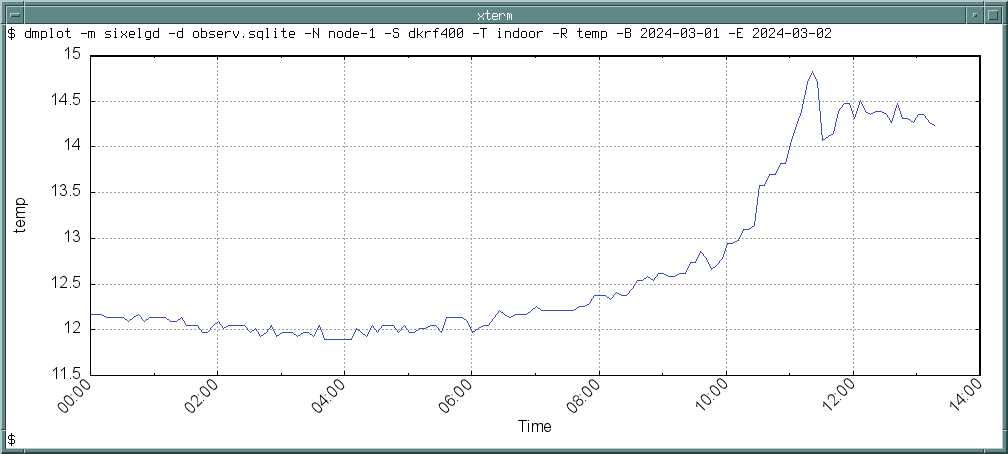
Output the plot directly to terminal, using the configuration in dmplot.conf:
$ dmplot --name dmplot --config dmplot.conf --terminal sixelgdThe sixelgd format requires a terminal emulator with Sixel support, such as xterm(1) or
mlterm(1).
dmrecv
The dmrecv program listens to the POSIX message queue of its name and writes received logs or
observations to stdout, file, or named pipe; in CSV, JSON Lines, or Namelist format. By default, the serialised
data is appended to the end of the output file. If argument --replace is passed, the file will be replaced
consecutively.
Received observations are not forwarded to the next specified receiver unless argument --forward is set.
If no receivers are defined or left, the observation will be discarded after output. If the JSON Lines output format is
selected, logs and observations are written as JSON objects to file or stdout, separated by new line
(\n). Use jq(1) to convert records in JSON Lines file input.jsonl into a valid JSON
array in output.json:
$ jq -s '.' input.jsonl > output.jsonThe output format block is only available for observation data and requires a response name to be set.
Observations will be searched for this response name and converted to data point type if found. The data point is
printed in ASCII block format.
The program settings are passed through command-line arguments or an optional configuration file. The arguments overwrite settings from file.
|———-|——-|–——|——-|——-| | log | | ✓ | ✓ | ✓ | | observ | ✓ | ✓ | ✓ | ✓ |
: Output formats of logs and observations
Command-Line Options
| Option | Short | Default | Description |
|---|---|---|---|
--config file |
-c |
– | Path to configuration file. |
--debug |
-D |
off | Forward log messages of level debug (if logger is set). |
--format format |
-f |
– | Output format (block, csv, jsonl,
nml). |
--forward |
-F |
off | Forward observations to the next specified receiver. |
--help |
-h |
– | Print available command-line arguments and quit. |
--logger name |
-l |
– | Optional name of logger. If set, sends logs to dmlogger process of given name. |
--name name |
-n |
dmrecv |
Name of table in configuration and POSIX message queue to subscribe to. |
--node id |
-N |
– | Optional node id. |
--output file |
-o |
stdout | Output file to append observations to (- for stdout). |
--replace |
-r |
off | Replace output file instead of appending data. |
--response name |
-R |
– | Name of observation response to output (required for format block). |
--type type |
-t |
– | Data type to receive: log or observ. |
--verbose |
-V |
off | Print log messages to stderr. |
--version |
-v |
– | Print version information and quit. |
Examples
Write log messages received from POSIX message queue /dmrecv to file /tmp/logs.csv in CSV
format:
$ dmrecv --name dmrecv --type log --format csv --output /tmp/logs.csvOutput observations in JSON Lines format to stdout:
$ dmrecv --name dmrecv --type observ --format jsonlWrite the observations serialised in JSON Lines format to named pipe /tmp/fifo_dmrecv:
$ mkfifo /tmp/fifo_dmrecv
$ dmrecv --name dmrecv --type observ --format jsonl --output /tmp/fifo_dmrecv
Another process can now read the observations from /tmp/fifo_dmrecv:
$ tail -f /tmp/fifo_dmrecvResponses in block format can also be piped to a graph tool like trend to update a chart in real-time. For instance, to pipe the
responses of name tz0 in observations received through message queue /dmrecv to the trend
graph program, run:
$ dmrecv --name dmrecv --type observ --format block --response tz0 \
  | gawk '{ print $2 | "trend - 60" }'
GNU awk is used to extract the response value from the stream, before it is piped to trend(1).
dmreport
The dmreport program generates reports in HTML, PDF, or PostScript format, containing plots of observations and/or log messages selected from database. Plots are created by calling gnuplot(1) and inlining the returned image. Reports in HTML format may contain GIF, PNG, or SVG images as base64-encoded data URI. Reports in PDF and PostScript format are generated with groff(1) and support only EPS images. Ghostscript must be installed for PDF generation.
The output of dmreport is a single file regardless of the format. The plot dimensions
width and height are in px for HTML output and in cm for PDF/PS output. Any style sheet file
with classless CSS can be included to alter the presentation of the HTML report. A basic style sheet
dmreport.css and its minified version dmreport.min.css are provided in
/usr/local/share/dmpack/dmreport/. The paper format of PDF/PS reports is always DIN A4, with a maximum plot
width of 17 cm.
Depending on the selected plot format, the environment variable GDFONTPATH may have to be set to the
local font directory containing the TrueType fonts first, for example:
$ export GDFONTPATH="/usr/local/share/fonts/webfonts/"Add the export statement to the global profile /etc/profile. If gnuplot(1) is installed under a
name other than gnuplot, for example, gnuplot-nox, create a symbolic link or add an alias to
/etc/profile:
alias gnuplot="gnuplot-nox"A configuration file is mandatory to create reports. Only a few parameters can be set through command-line arguments. Passed command-line arguments have priority over settings in the configuration file.
| Format | Description |
|---|---|
gif |
GIF format (HTML) |
png |
PNG format (HTML) |
pngcairo |
PNG format, generated from vector graphics (HTML) |
postscript |
EPS format (PDF, PostScript) |
svg |
SVG format (HTML) |
| Descriptor | Description (Format) |
|---|---|
%Y |
year (YYYY) |
%M |
month (MM) |
%D |
day of month (DD) |
%h |
hour (hh) |
%m |
minute (mm) |
%s |
second (ss) |
Command-Line Options
| Option | Short | Default | Description |
|---|---|---|---|
--config file |
-c |
– | Path to configuration file (required). |
--format name |
-F |
– | Output format (html, pdf, ps). |
--from timestamp |
-B |
– | Start of time range in ISO 8601. |
--help |
-h |
– | Print available command-line arguments and quit. |
--name name |
-n |
dmreport |
Name of program instance and configuration. |
--node id |
-N |
– | Sensor node id. |
--output path |
-o |
– | Path of the output file. May include format descriptors. |
--style path |
-C |
– | Path to the CSS file to inline. |
--to timestamp |
-E |
– | End of time range in ISO 8601. |
--version |
-v |
– | Print version information and quit. |
Examples
The settings are stored in Lua table dmreport in the configuration file. The observations are read from
database /var/dmpack/observ.db, the log messages from /var/dmpack/log.db.
-- dmreport.conf
dmreport = {
  node = "dummy-node",
  from = "1970-01-01T00:00:00.000000+00:00",
  to = "2070-01-01T00:00:00.000000+00:00",
  format = "html",
  output = "%Y-%M-%D_dummy-report.html",
  style = "/usr/local/share/dmpack/dmreport/dmreport.min.css",
  title = "Monitoring Report",
  subtitle = "Project",
  author = "Jane Doe",
  meta = "",
  verbose = true,
  plots = {
    disabled = false,                   -- Disable plots.
    database = "/var/dmpack/observ.db", -- Path to observation database.
    title = "Plots",                    -- Overwrite default heading.
    meta = "",                          -- Optional description.
    observations = {                    -- List of plots to generate.
      {
        disabled = false,               -- Disable plot.
        sensor = "dummy-sensor",        -- Sensor id (required).
        target = "dummy-target",        -- Target id (required).
        response = "tz0",               -- Response name (required).
        unit = "deg C",                 -- Response unit.
        scale = 1.0,                    -- Response value scale factor.
        format = "svg",                 -- Plot format.
        title = "Temperature",          -- Plot title.
        subtitle = "tz0",               -- Plot sub-title.
        meta = "",                      -- Optional description.
        color = "#ff0000",              -- Graph colour.
        width = 1000,                   -- Plot width [px, cm].
        height = 300,                   -- Plot height [px, cm].
        pagebreak = false               -- Add page break afterwards (PDF/PS only).
      }
    }
  },
  logs = {
    disabled = false,                   -- Disable logs.
    database = "/var/dmpack/log.db",    -- Path to log database.
    minlevel = LL_WARNING,              -- Minimum log level (default: LL_WARNING).
    maxlevel = LL_CRITICAL,             -- Maximum log level (default: LL_CRITICAL).
    title = "Logs",                     -- Overwrite default heading.
    meta = ""                           -- Optional description.
  }
}
The sensor node dummy-node, the sensor dummy-sensor, and the target
dummy-target must exist in database /var/dmpack/observ.db, and the observations to plot need
to have responses of name tz0. Write a report to file report.html based on settings in
dmreport.conf. The command-line arguments overwrite the settings of the configuration file:
$ dmreport --name dmreport --config dmreport.conf --output report.htmlIn order to update reports periodically, we can customise the shell script mkreport.sh in
/usr/local/share/dmpack/dmreport/. The script determines the timestamps of the last and the current month
(to allow observations to arrived late), which will then be passed to dmreport to create monthly
reports. Modify the script according to your set-up:
dmreport="/usr/local/bin/dmreport"
name="dmreport"
config="/usr/local/etc/dmpack/dmreport.conf"
output="/var/www/reports/"
The shell script writes two reports to /var/www/reports/.
$ sh /usr/local/share/dmpack/dmreport/mkreport.sh
--- Writing report of 2023-08 to file /var/www/reports/2023-08_report.html ...
--- Writing report of 2023-09 to file /var/www/reports/2023-09_report.html ...
The directory may be served by lighttpd(1). Add the script to your crontab to run the report generation periodically.
dmsend
The dmsend program reads observations or logs in CSV and Fortran 95
Namelist format, and sends them sequentially to the POSIX message queue of a given receiver. The data is either read
from file or standard input. If the input data is of type observ and the argument --forward is
passed, each observation will be sent to its next specified receiver in the receivers list instead of the receiver given
through argument --receiver. If no receivers are set, or if the end of the receivers list is reached, the
observation will be discarded.
The program settings are passed through command-line arguments or an optional configuration file. The arguments overwrite settings from file.
Command-Line Options
| Option | Short | Default | Description |
|---|---|---|---|
--config file |
-c |
– | Path to configuration file. |
--debug |
-D |
off | Forward log messages of level debug (if logger is set). |
--format format |
-f |
– | Input format: csv or nml. |
--forward |
-F |
off | Forward observations to the next specified receiver. |
--help |
-h |
– | Print available command-line arguments and quit. |
--input file |
-i |
stdin | Path to input file (empty or - for stdin). |
--logger name |
-l |
– | Optional name of logger. If set, sends logs to dmlogger process of given name. |
--name name |
-n |
dmsend |
Name of instance and table in configuration. |
--node id |
-N |
– | Optional node id. |
--receiver name |
-r |
– | Name of receiver/message queue. |
--type type |
-t |
– | Input data type: log or observ. |
--verbose |
-V |
off | Print log messages to stderr. |
--version |
-v |
– | Print version information and quit. |
Examples
Read a single observation from Namelist file observ.nml and send it to the next receiver specified by
attribute next:
$ dmsend --type observ --format nml --input observ.nml --forwardSend multiple logs in CSV file logs.csv sequentially to process dmrecv:
$ dmsend --receiver dmrecv --type log --format csv --input logs.csvdmserial
The dmserial program sends requests to a sensor or actor connected via USB/RS-232/RS-422/RS-485. Sensor commands and responses are sent/received through a teletype (TTY) device provided by the operating system. A pseudo-terminal (PTY) may be used to connect a virtual sensor.
Each request of an observation must contains the raw request intended for the sensor in attribute
request. Response values are extracted by group from the raw response using the given regular expression
pattern. Each group name must match a response name. Response names are limited to 32 characters. Observations will be
forwarded to the next receiver via POSIX message queue if any receiver is specified. The program can act as a sole data
logger if output file and format are set. If the output is set to -, observations are printed to
stdout.
A configuration file is mandatory to configure the jobs to perform. Each observation must have a valid target id. The database must contain the specified node, sensor, and targets. Parameters and functions of the Lua API may be used in the configuration file. The following baud rates are supported: 50, 75, 110, 134, 150, 200, 300, 600, 1200, 1800, 2400, 4800, 9600, 19200, 38400, 57600, 115200, 230400, 460800, 921600.
Command-Line Options
| Option | Short | Default | Description |
|---|---|---|---|
--baudrate n |
-B |
9600 | Number of symbols transmitted per second. |
--bytesize n |
-Z |
8 | Byte size (5, 6, 7, 8). |
--config file |
-c |
– | Path to configuration file (required). |
--debug |
-D |
off | Forward log messages of level debug (if logger is set). |
--dtr |
-Q |
off | Enable Data Terminal Ready (DTR). |
--format format |
-f |
– | Output format, either csv or jsonl. |
--help |
-h |
– | Print available command-line arguments and quit. |
--logger name |
-l |
– | Optional name of logger. If set, sends logs to dmlogger process of given name. |
--name name |
-n |
dmserial |
Name of instance and table in configuration. |
--node id |
-N |
– | Node id. |
--output file |
-o |
– | Output file to append observations to (- for stdout). |
--parity name |
-P |
none |
Parity bits (none, even, or odd). |
--rts |
-R |
off | Enable Request To Send (RTS). |
--sensor id |
-S |
– | Sensor id. |
--stopbits n |
-O |
1 | Number of stop bits (1, 2). |
--timeout n |
-T |
0 | Connection timeout in seconds (max. 25). |
--path path |
-p |
– | Path to TTY/PTY device (for example, /dev/ttyU0). |
--verbose |
-V |
off | Print log messages to stderr. |
--version |
-v |
– | Print version information and quit. |
Examples
Read the jobs to perform from configuration file and execute them sequentially:
$ dmserial --name dmserial --config /usr/local/etc/dmpack/dmserial.conf --verbosedmsync
The dmsync program synchronises logs, nodes, observations, sensors, and targets from local databases concurrently with a remote dmapi server. The synchronisation may be started only once if no interval is set (to transfer nodes, sensors, and targets initially from client to server), periodically as a cron job, or by waiting for a POSIX semaphore.
The nodes, sensors, and targets referenced by observations in the local database must also exist in the remote server database. They can be created on the server with dmdbctl or dmweb, or sent from client to server with dmsync. Logs and targets do not require any additional database entries on the server-side.
The client databases must contain synchronisation tables. The tables are created automatically by dminit if command-line argument --sync is passed. Otherweise, start
dmsync with argument --create once to add the missing tables.
If the RPC server uses HTTP Basic Auth for authentication, the RPC user name must match the node id of the transmitted node, sensor, observation, log, or beat records, or the server will reject the requests and return HTTP 401 (Unauthorized).
The database records are serialised in Fortran 95 Namelist format and optionally compressed before being sent to the
server. The program uses libcurl for data transfer, and deflate or zstd for compression. The RPC API endpoints to post
records to are expected at URL [http|https]://<host>:<port>/api/v2/<endpoint>.
The result of each synchronisation attempt is stored in the local database. Records are marked as synchronised only if the server returns HTTP 201 (Created).
Passing the server credentials via the command-line arguments --username and --password is
insecure on multi-user operating systems and only recommended for testing.
Command-Line Options
| Option | Short | Default | Description |
|---|---|---|---|
--compression name |
-x |
zstd |
Compression library to use (none, zlib, zstd). |
--config file |
-c |
– | Path to configuration file. |
--create |
-C |
off | Create missing database synchronisation tables. |
--database file |
-d |
– | Path to log or observation database. |
--debug |
-D |
off | Forward log messages of level debug (if logger is set). |
--help |
-h |
– | Print available command-line arguments and quit. |
--host host |
-H |
– | IP address or FQDN of HTTP-RPC API host (for instance, 127.0.0.1 or iot.example.com). |
--interval sec |
-I |
60 | Synchronisation interval in seconds. If set to 0, synchronisation is executed only once. |
--logger name |
-l |
– | Name of logger. If set, sends logs to dmlogger process of given name. |
--name name |
-n |
dmsync |
Name of program instance and configuration. |
--node id |
-N |
– | Node id, required for types sensor and observ. |
--password string |
-P |
– | API password. |
--port port |
-q |
0 | Port of HTTP-RPC API server (0 for automatic). |
--tls |
-E |
off | Use TLS-encrypted connection. |
--type type |
-t |
– | Type of data to sychronise, either log, node, observ, sensor, or
target. Type log requires a log database, all other an observation database. |
--username string |
-U |
– | API user name. If set, implies HTTP Basic Auth. |
--verbose |
-V |
off | Print log messages to stderr. |
--version |
-v |
– | Print version information and quit. |
--wait name |
-w |
– | Name of POSIX semaphore to wait for. Synchronises databases if semaphore is > 0. |
Examples
Initially synchronise nodes, sensors, and targets in the local observation database with an HTTP-RPC server (without authentication):
$ dmsync --database observ.db --type node --host 192.168.1.100
$ dmsync --database observ.db --type sensor --node dummy-node --host 192.168.1.100
$ dmsync --database observ.db --type target --host 102.168.1.100
Synchronise observations:
$ dmsync --database observ.db --type observ --host 192.168.1.100Synchronise log messages:
$ dmsync --database log.db --type log --host 192.168.1.100dmsystem
The dmsystem program is a system monitor that watches free disk space and disk capacity, database sizes, load average, CPU temperature, and system uptime. The file system for the free disk space and disk capacity responses is determined through a given file or directory path. The paths to the log and observation databases have to be given in the configuration file.
- cpu_temp
-
CPU temperature [°C]. Depending on the hardware, temperature measurement may not be provided or must be activated in BIOS/UEFI first. Disabled by default.
- disk_free
-
Free disk space [Byte]. Requires file or directory path.
- disk_capacity
-
Disk capacity [%]. Requires file or directory path.
- load_avg1
-
Load average, last minute. Enabled by default.
- load_avg5
-
Load average, last 5 minutes. Enabled by default.
- load_avg15
-
Load average, last 15 minutes. Enabled by default.
- log_db
-
Size of log database [Byte]. Requires database path.
- observ_db
-
Size of observation database [Byte]. Requires database path.
- uptime
-
System uptime [sec]. Enabled by default.
Command-Line Options
| Option | Short | Default | Description |
|---|---|---|---|
--config file |
-c |
– | Path to configuration file. |
--count n |
-C |
0 | Number of observations to create. No limit if set to 0 (default). |
--debug |
-D |
off | Forward log messages of level debug (if logger is set). |
--help |
-h |
– | Print available command-line arguments and quit. |
--interval sec |
-I |
600 | Interval in seconds in which to read the system parameters. |
--logger name |
-l |
– | Optional name of logger. If set, sends logs to dmlogger process of given name. |
--name name |
-n |
dmsystem |
Optional name of instance and table in configuration. |
--node id |
-N |
– | Node id. |
--receiver name |
-r |
– | Name of observation receiver/message queue. |
--sensor id |
-S |
– | Sensor id. |
--target id |
-T |
– | Target id. |
--verbose |
-V |
off | Print log messages to stderr. |
--version |
-v |
– | Print version information and quit. |
Examples
Read system parameters every 60 seconds and forward observations to dmrecv:
$ dmsystem --node dummy-node --sensor dummy-sensor --target dummy-target \
  --interval 60 --receiver dmrecv --verbose
A configuration file is required in order to monitor file system and database, for example:
-- dmsystem.conf
dmsystem = {
  logger = "",
  node = "dummy-node",
  sensor = "dummy-sensor",
  target = "dummy-target",
  receiver = "dmdb",
  count = 0,
  interval = 60,
  options = {
    cpu_temp = true,
    disk_free = "/var/dmpack",
    load_avg1 = true,
    load_avg5 = true,
    load_avg15 = true,
    log_db = "/var/dmpack/log.db",
    observ_db = "/var/dmpack/observ.db",
    uptime = true
  },
  debug = false,
  verbose = false
}
Observations are created every 60 seconds and forwarded to dmdb. Node dummy-node, sensor
dummy-sensor, and target dummy-target must exist in the observation database. Start the system
monitoring:
$ dmsystem --name dmsystem --config /usr/local/etc/dmpack/dmsystem.conf --verbosedmupload
The dmupload program uploads camera images from local database and file system to a remote server through HTTP-RPC API requests. The upload may be started only once, periodically in a given interval, or by waiting for a POSIX semaphore.
The image database must contain a synchronisation table. The table is created automatically by dminit if command-line argument --sync is passed. Alternatively, start
dmupload with argument --create once.
The result of each upload attempt is stored in the local image database. Records are marked as uploaded only if the server returns HTTP 201 (Created).
Passing the server credentials via the command-line arguments --username and --password is
insecure on multi-user operating systems and only recommended for testing.
Command-Line Options
| Option | Short | Default | Description |
|---|---|---|---|
--compression name |
-x |
zstd |
Compression library to use (none, zlib, zstd). |
--config file |
-c |
– | Path to configuration file. |
--create |
-C |
off | Create missing database tables required for uploading. |
--database file |
-d |
– | Path to image database. |
--debug |
-D |
off | Forward log messages of level debug (if logger is set). |
--directory path |
-p |
– | Path to the directory of stored images. |
--help |
-h |
– | Print available command-line arguments and quit. |
--host host |
-H |
– | IP address or FQDN of HTTP-RPC API host (for instance, 127.0.0.1 or iot.example.com). |
--interval sec |
-I |
60 | Synchronisation interval in seconds. If set to 0, synchronisation is executed only once. |
--logger name |
-l |
– | Name of logger. If set, sends logs to dmlogger process of given name. |
--name name |
-n |
dmupload |
Name of program instance and configuration. |
--node id |
-N |
– | Node id. |
--password string |
-P |
– | API password. |
--port port |
-q |
0 | Port of HTTP-RPC API server (0 for automatic). |
--tls |
-E |
off | Use TLS-encrypted connection. |
--username string |
-U |
– | API user name. If set, implies HTTP Basic Auth. |
--verbose |
-V |
off | Print log messages to stderr. |
--version |
-v |
– | Print version information and quit. |
--wait name |
-w |
– | Name of POSIX semaphore to wait for. Synchronises database if semaphore is > 0. |
Examples
Run dmcamera to capture an image from USB camera /dev/video every
30 seconds and trigger semaphore /dmcamera for IPC afterwards:
$ dmcamera --name dmcamera --node dummy-node --sensor dummy-sensor \
  --target dummy-target --database /var/dmpack/image.db --directory /var/dmpack/images \
  --device v4l2 --input /dev/video0 --interval 30 --ipc --verbose
Wait for semaphore /dmcamera and upload the images to the HTTP-RPC server 192.168.1.100
without authentication:
$ dmupload --wait dmcamera --node dummy-node --database /var/dmpack/image.db \
  --directory /var/dmpack/images --host 192.168.2.100 --verbose
dmuuid
The dmuuid program is a command-line tool to generate pseudo-random UUIDs. By default, DMPACK uses
32 characters long UUIDv4 identifiers in hexadecimal format (without hyphens). Hyphens can be added by a command-line
flag. The option --convert expects UUIDv4 identifiers to be passed via standard input. Invalid identifiers
will be replaced with the default UUID. The program may be used to create a feed id for dmfeed.
Command-Line Options
| Option | Short | Default | Description |
|---|---|---|---|
--convert |
-c |
off | Add hyphens to 32 characters long hexadecimal UUIDs passed via stdin. |
--count n |
-n |
1 | Number of identifiers to generate. |
--help |
-h |
– | Print available command-line arguments and quit. |
--hyphens |
-p |
off | Return 36 characters long UUIDv4 with hyphens. |
--version |
-v |
– | Print version information and quit. |
Examples
Create three identifiers:
$ dmuuid --count 3
6827049760c545ad80d4082cc50203e8
ad488d0b8edd4c6c94582e702a810ada
3d3eee7ae1fb4259b5df72f854aaa369
Create a UUIDv4 with hyphens:
$ dmuuid --hyphens
d498f067-d14a-4f98-a9d8-777a3a131d12
Add hyphens to a hexadecimal UUID:
$ echo "3d3eee7ae1fb4259b5df72f854aaa369" | dmuuid --convert
3d3eee7a-e1fb-4259-b5df-72f854aaa369
dmved
The dmved program captures VE.Direct status data received from a connected Victron Energy Maximum Power Point Tracking (MPPT) solar charge controller or battery monitor, either:
BlueSolar MPPT series,
SmartSolar MPPT series,
SmartShunt.
An official Victron Energy USB cable or TTL adapter with JST PH connector is required for data link. The TTY will be configured to 19200 baud (8N1). Values are captured once per second. An observation containing the responses of the device is sent in the specified interval to the configured receiver.
Fields
The following VE.Direct fields are supported, depending on the device:
| Response | Unit | MPPT | Shunt | Description |
|---|---|---|---|---|
alarm |
– | ✓ | alarm condition active (on/off) | |
ar |
– | ✓ | alarm reason | |
ce |
Ah | ✓ | consumed amp hours | |
cs |
– | ✓ | state of operation | |
dm |
% | ✓ | mid-point deviation of the battery bank | |
err |
– | ✓ | error code | |
h1 |
Ah | ✓ | depth of the deepest discharge | |
h2 |
Ah | ✓ | depth of the last discharge | |
h3 |
Ah | ✓ | depth of the average discharge | |
h4 |
– | ✓ | number of charge cycles | |
h5 |
– | ✓ | number of full discharges | |
h6 |
Ah | ✓ | cumulative amp hours drawn | |
h7 |
V | ✓ | minimum main (battery) voltage | |
h8 |
V | ✓ | maximum main (battery) voltage | |
h9 |
sec | ✓ | number of seconds since last full charge | |
h10 |
– | ✓ | number of automatic synchronisations | |
h11 |
– | ✓ | number of low main voltage alarms | |
h12 |
– | ✓ | number of high main voltage alarms | |
h15 |
V | ✓ | minimum auxiliary (battery) voltage | |
h16 |
V | ✓ | maximum auxiliary (battery) voltage | |
h17 |
kWh | ✓ | amount of produced energy | |
h18 |
kWh | ✓ | amount of consumed energy | |
h19 |
kWh | ✓ | yield total (user resettable counter) | |
h20 |
kWh | ✓ | yield today | |
h21 |
W | ✓ | maximum power today | |
h22 |
kWh | ✓ | yield yesterday | |
h23 |
W | ✓ | maximum power yesterday | |
hsds |
– | ✓ | day sequence number (0 to 364) | |
i |
A | ✓ | ✓ | main or channel 1 battery current |
il |
A | ✓ | load current | |
load |
– | ✓ | load output state (on/off) | |
mon |
– | ✓ | DC monitor mode | |
mppt |
– | ✓ | tracker operation mode | |
or |
– | ✓ | off reason | |
p |
W | ✓ | instantaneous power | |
ppv |
W | ✓ | panel power | |
relay |
– | ✓ | ✓ | relay state (on/off) |
soc |
% | ✓ | state-of-charge | |
t |
°C | ✓ | battery temperature | |
ttg |
min | ✓ | time-to-go | |
v |
V | ✓ | ✓ | main or channel 1 (battery) voltage |
vm |
V | ✓ | mid-point voltage of the battery bank | |
vpv |
V | ✓ | panel voltage | |
vs |
V | ✓ | auxiliary (starter) voltage |
- ar
-
This field describes the cause of the alarm. Since multiple alarm conditions can be present at the same time the values of the separate alarm conditions are added.
Value Cause 1 low voltage 2 high voltage 4 low SOC 8 low starter voltage 16 high starter voltage 32 low temperature 64 high temperature 128 mid voltage - cs
-
The state of the MPPT operation.
Value State 0 off 2 fault 3 bulk 4 absorption 5 float 7 equalise (manual) 245 starting-up 247 auto-equalise/recondition 252 external control - err
-
The error code of the device, relevant when the device is in fault state.
Error 19 can be ignored, this condition regularly occurs during start-up or shutdown of the MPPT charger. Since version 1.15 this error will no longer be reported.
Error 21 can be ignored for 5 minutes, this condition regularly occurs during start-up or shutdown of the MPPT charger. Since version 1.16 this warning will no longer be reported when it is not persistent.
Value Error 0 no error 2 battery voltage too high 17 charger temperature too high 18 charger over current 19 charger current reversed 20 bulk time limit exceeded 21 current sensor issue (sensor bias/sensor broken) 26 terminals overheated 28 converter issue (dual converter models only) 33 input voltage too high (solar panel) 34 input current too high (solar panel) 38 input shutdown (due to excessive battery voltage) 39 input shutdown (due to current flow during off mode) 65 lost communication with one of devices 66 synchronised charging device configuration issue 67 BMS connection lost 68 network misconfigured 116 factory calibration data lost 117 invalid/incompatible firmware 119 user settings invalid - hsds
-
The day sequence number in range 0 to 364. A change in this number indicates a new day. This implies that the historical data has changed.
- mppt
-
The tracker operation mode.
Value Mode 0 off 1 voltage or current limited 2 MPPT active - or
-
The off reason of the charger. This field describes why a unit is switched off.
Value Reason 1 no input power 2 switched off (power switch) 4 switched off (device mode register) 8 remote input 16 protection active 32 pay-as-you-go (PAYGo) 64 BMS 128 engine shutdown detection 256 analysing input voltage
Command-Line Options
| Option | Short | Default | Description |
|---|---|---|---|
--config file |
-c |
– | Path to configuration file. |
--debug |
-D |
off | Forward log messages of level debug (if logger is set). |
--device name |
-d |
– | Type of connected device (mppt or shunt). |
--dump path |
-o |
– | Path of file or named pipe to dump received raw data to. |
--help |
-h |
– | Print available command-line arguments and quit. |
--interval sec |
-I |
60 | Observation emit interval in seconds. |
--logger name |
-l |
– | Optional name of logger. If set, sends logs to dmlogger process of given name. |
--name name |
-n |
dmved |
Name of instance and table in configuration. |
--node id |
-N |
– | Optional node id. |
--path path |
-p |
– | Path to TTY device (for example, /dev/ttyUSB0). |
--receiver name |
-r |
– | Name of observation receiver/message queue. |
--sensor id |
-S |
– | Sensor id. |
--target id |
-T |
– | Target id. |
--verbose |
-V |
off | Print log messages to stderr. |
--version |
-v |
– | Print version information and quit. |
Examples
For a connected SmartSolar MPPT charger, create a configuration file dmved.conf, set the device to
mppt and the path to the TTY path, for example /dev/ttyUSB0 if a Victron Energy USB adapter
cable is used. Change node id, sensor id, and target id to your setup:
-- dmved.conf
dmved = {
  logger = "",             -- No log forwarding.
  device = "mppt",         -- Device is MPPT.
  node = "dummy-node",     -- Node id.
  sensor = "dummy-sensor", -- Sensor id.
  target = "dummy-target", -- Target id.
  path = "/dev/ttyUSB0",   -- Path of serial device.
  dump = "",               -- Path of dump file.
  receiver = "dmrecv",     -- Name of receiver.
  interval = 60,           -- Forward observations every minute.
  debug = false,           -- Disable forwarding of debug messages.
  verbose = false          -- Print logs to standard error.
}
Start dmved to read and forward status data from the connected MPPT every 60 seconds:
$ dmved --name dmved --config /usr/local/etc/dmpack/dmved.conf --verboseStart dmrecv to receive observations and output them to stdout in JSONL format:
$ dmrecv --name dmrecv --type observ --format jsonldmweb
dmweb is a CGI-based web user interface for DMPACK database access on client and server. The web application has to be executed through a CGI-compatible web server. It is recommended to run lighttpd(1). Any other server must be able to pass environment variables to the CGI application. gnuplot(1) is required for the plotting back-end (no-X11 flavour is sufficient).
The web application provides the following pages:
- Dashboard
-
Lists heartbeats, logs, and observations that have been added to the databases most recently.
- Nodes
-
Lists all sensor nodes, and allows to add new ones.
- Sensors
-
Lists all sensors, and allows to add new ones.
- Targets
-
Lists all targets, and allows to add new ones.
- Observations
-
Lists observations in database, selected by filter.
- Plots
-
Creates plots in SVG format from observation responses in database.
- Logs
-
Lists log messages stored in database, with optional filter.
- Beats
-
Lists received heartbeat messages, sorted by node id. The beat view shows the time the heartbeat was sent and received, as well as the time passed since then, additionally in Swatch Internet Time.
- Images
-
Shows uploaded camera images.
- Map
-
Displays nodes, sensors, and targets inside an interactive map.
The style sheet of dmweb is based on missing.css. It can be replaced with any other classless CSS theme. For best experience, the IBM Plex font family should be installed locally.
If gnuplot(1) is installed under a name other than gnuplot, for example,
gnuplot-nox, create a symbolic link or add an alias to the global profile /etc/profile:
alias gnuplot="gnuplot-nox"On FreeBSD, it might be necessary to add the environment variable GDFONTPATH to the path of the font
directory:
export GDFONTPATH="/usr/local/share/fonts/webfonts/"| Environment Variable | Description |
|---|---|
DM_BEAT_DB |
Path to heartbeat database (server). |
DM_IMAGE_DB |
Path to image database (optional). |
DM_IMAGE_DIR |
Path to image file directory relative to WWW document root (optional). |
DM_LOG_DB |
Path to log database (client, server). |
DM_OBSERV_DB |
Path to observation database (client, server). |
DM_READ_ONLY |
Set to 1 to enable read-only database access. |
DM_TILE_URL |
URL of tile server. |
The map view requires a URL to the tile server in environment variable DM_TILE_URL. For example, set the
variable to https://tile.openstreetmap.org/{z}/{x}/{y}.png to use OpenStreetMap as the tile backend.
Copy the directory /usr/local/share/dmpack/dmweb manually to the WWW root directory, or create a
symlink. Environment variables are used to configure dmweb. Transport security and authentication have
to be managed by the web server. See section Web UI for an example
configuration.